

Presented by

Happy January 13th, Industry 4.0!
Monday the 13th. Not quite as ominous as its Friday counterpart, but if you've ever watched a PLC throw a fault code at 6:47 AM while the coffee machine is still warming up, you know Mondays carry their own special brand of chaos.
CES just wrapped up in Vegas, and the tech world is buzzing about AI-powered toothbrushes and refrigerators that judge your leftovers. Meanwhile, back on the factory floor, you're still trying to get that one legacy gateway to stop dropping packets every third Tuesday.
But here's the thing—while the consumer tech crowd chases shiny objects, some genuinely useful developments slipped through this week. Python just shipped a feature that will save your containerized edge analytics from countless restart cycles. GitHub Actions users got a wake-up call about what's lurking in their CI/CD pipelines. And Cursor shared the secret sauce behind how AI coding assistants are getting smarter without burning through your token budget.
We've also got a cautionary tale about what happens when AI doesn't just replace your product—it intercepts your entire sales funnel. Spoiler: it's not pretty.
The theme this week? The tools are evolving faster than the playbooks. The teams that stay curious will stay ahead.
Here's what caught our attention:
Python 3.14's Secret Weapon for Debugging Containerized Applications

Python 3.14 just shipped a feature that will save your containerized edge analytics from countless restart cycles.
If you've ever tried to debug a Python application running inside a Docker container or Kubernetes pod, you know the pain. Something breaks at 2 AM. The logs don't tell you enough. And your only option is to add more print statements, rebuild the image, redeploy, and hope you guessed right.
That workflow is now obsolete.
The new sys.remote_exec() function lets you inject and execute Python code inside a running process—without restarting it. Your app keeps serving requests while you poke around in its memory, check variable states, or even change log levels on the fly.
How it works:
When you call sys.remote_exec(pid, "debug_script.py"), Python signals to the target process that it should execute your script at the next "safe evaluation point." The injected script runs with full access to the target's memory, modules, and state—exactly what you need to start a debug server on demand.
For containerized deployments, a tool called debugwand (built by Python Steering Council member Savannah Ostrowski) wraps this into a zero-preparation workflow:
- Finds your target – Discovers pods in Kubernetes, identifies Python processes in containers
- Injects debugpy – Uses
sys.remote_exec()to start a debug server without restarting anything - Handles port-forwarding – Sets up the connection automatically for Kubernetes
- Connects your editor – Point VS Code at localhost:5679 and you're debugging live
The catch:
You need to enable the SYS_PTRACE capability on your containers. In Docker, that's --cap-add=SYS_PTRACE. In Kubernetes, you'll need to configure it in your security context. This is a development/staging tool—don't enable ptrace in production unless you understand the security implications.
Why this matters for manufacturing:
Think about your edge analytics running on a plant-floor gateway. Your Python-based data pipeline is aggregating sensor readings and pushing to your historian, but something's off—values look wrong, but the logs don't explain why.
Previously, you'd have to stop the pipeline, add debugging code, rebuild, redeploy, and lose data during the gap. Now? Connect remotely, inspect the state of your data transformations mid-flight, find the issue, and disconnect. The pipeline never stops.
Real-world scenario:
Your MQTT-to-database bridge is dropping messages intermittently. With sys.remote_exec(), you can inject a script that logs the current queue depth, inspects the connection state, or even temporarily increases the log level from INFO to DEBUG—all while the bridge keeps running.
The bottom line:
Python finally has native support for attaching to running processes. For anyone running Python in containers—whether that's edge analytics, API services, or data pipelines—this is a game-changer for troubleshooting without downtime.
Getting started:
bash
# Install debugwand
uv tool install debugwand

# Start your container with ptrace enabled
docker run --cap-add=SYS_PTRACE your-image

# Connect to running process
debugwand kubernetes your-service
Read the full breakdown on sys.remote_exec() →
Your CI/CD Pipeline Is the New Attack Surface (And It's More Exposed Than You Think)
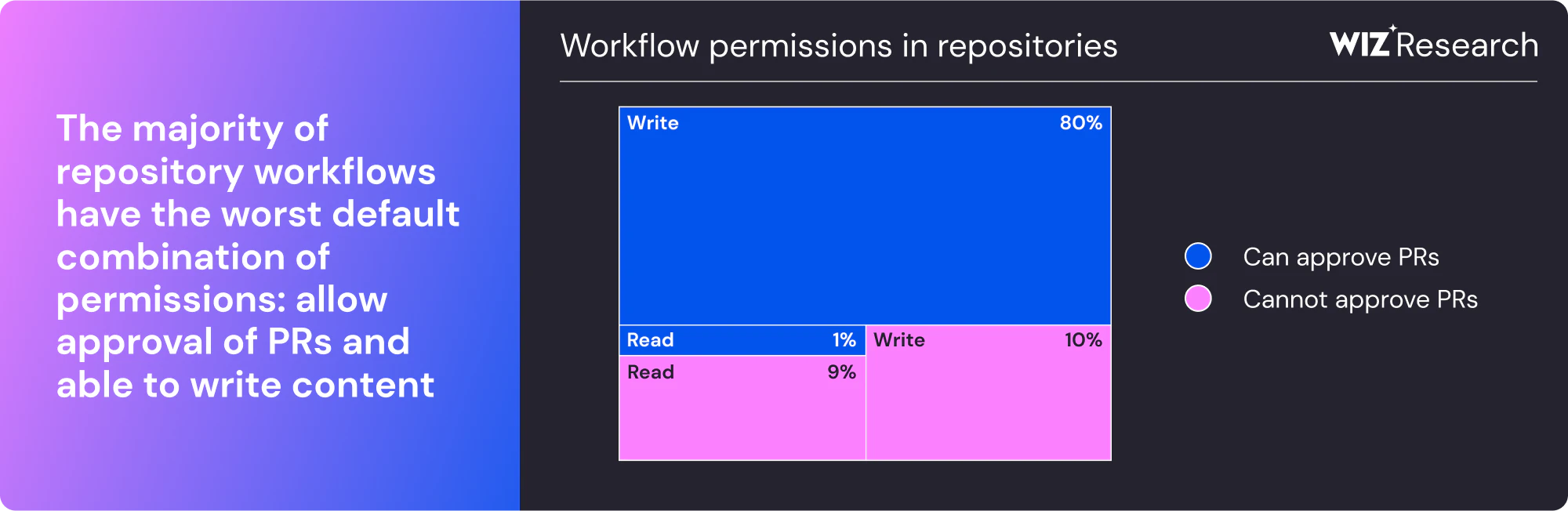
Over 23,000 repositories. Secrets dumped to public logs. No external server needed.
That's what happened in March 2025 when attackers compromised tj-actions/changed-files—a GitHub Action used by thousands of organizations to track file changes in their CI/CD pipelines. The attack was elegant in its simplicity: inject a Python script that scans the GitHub Runner's memory for secrets and prints them directly to workflow logs.
No exfiltration to shady servers. Just your AWS keys, GitHub tokens, npm credentials, and private RSA keys sitting in publicly accessible logs.
How the attack worked:
The compromise started with reviewdog/action-setup, where attackers exploited a flawed contributor management process to gain write access. From there, they stole credentials that gave them access to tj-actions/changed-files. Then came the clever part: they retroactively modified all existing version tags to point to their malicious commit.
If you were using tj-actions/changed-files@v44 or any other version tag, you were suddenly running attacker-controlled code—even if you'd been using that exact version safely for months.
The collateral damage:
The attackers were targeting Coinbase. But because of how supply chain attacks cascade, the attack impacted nearly 70,000 Coinbase customers Dark Reading and exposed secrets across thousands of other repositories that happened to use the same Action.
Why this matters for manufacturing:
If your team uses GitHub Actions for anything—deploying edge applications, building container images for plant-floor systems, managing infrastructure as code—your CI/CD pipeline has access to production credentials. Cloud provider keys. Database passwords. API tokens for your historians and SCADA systems.
A compromised pipeline action doesn't just leak code. It leaks the keys to your operational technology.
The new threat: AI agents in your pipeline
As if supply chain attacks weren't enough, security researchers at Aikido discovered a new vulnerability class they're calling "PromptPwnd." At least 5 Fortune 500 companies are impacted Aikido, with early indicators suggesting the same flaw exists in many others.
The pattern: Untrusted user input (like a commit message or PR description) gets fed to an AI agent running in your pipeline. The attacker crafts that input as a malicious prompt, and the AI dutifully executes privileged operations—like changing a GitHub issue title to include your access token.
Google's own Gemini CLI repository was affected Aikido before they patched it.
Your action items:
- Pin Actions to full commit SHAs, not version tags. Tags are mutable.
actions/checkout@v4can be silently redirected.actions/checkout@b4ffde65f46336ab88eb53be808477a3936bae11cannot. - Audit your third-party Actions. Run a code search across your repositories for any Actions you're importing. Remove anything unused or unmaintained.
- Minimize secrets in workflows. Use OIDC for cloud provider authentication instead of long-lived credentials where possible.
- Monitor for AI agent misconfigurations. If you're using Claude Code Actions, Codex, or Gemini in your pipelines, ensure they're not configured to run on untrusted triggers.
- Use hardening tools. Check out zizmor for static analysis of GitHub Actions and StepSecurity's Harden Runner for runtime monitoring.
The bottom line:
Your CI/CD pipeline runs with the keys to your kingdom. Every third-party Action you import is code you're trusting to run with those keys. The tj-actions attack proved that trust can be violated retroactively—and the PromptPwnd research shows AI agents are opening new attack vectors we're just beginning to understand.
Read the full GitHub Actions security guide from Wiz →
How Cursor Cut Token Usage by 47%—And What It Means for Industrial AI Agents
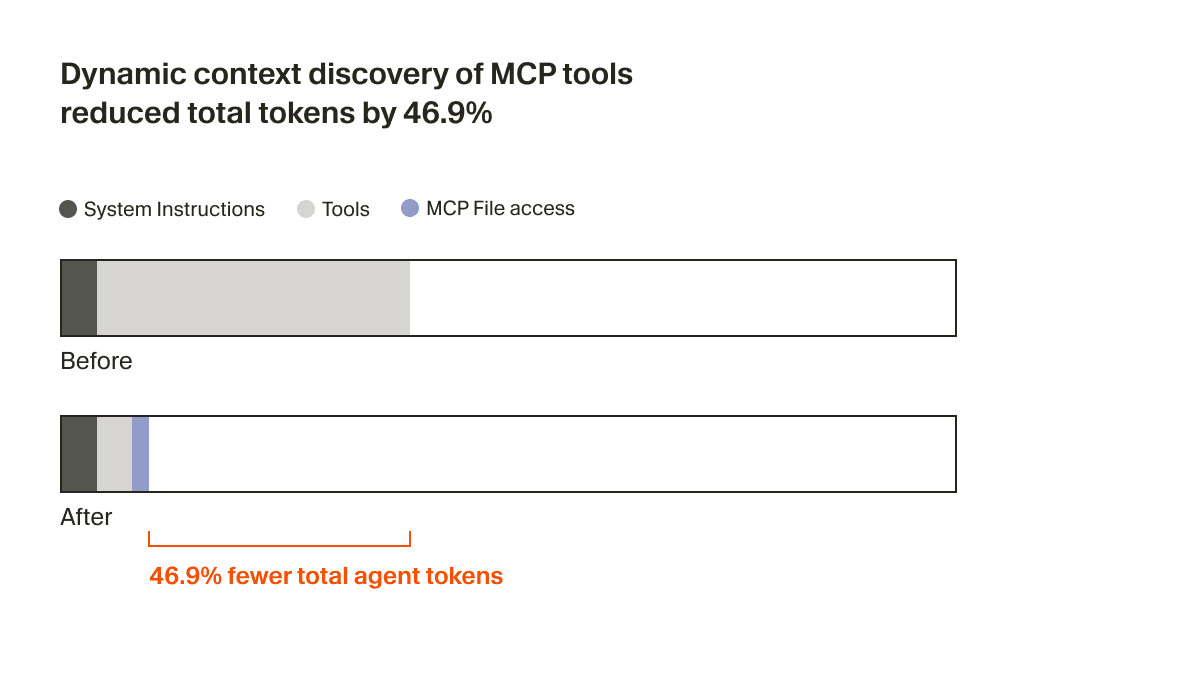
The secret to better AI agents isn't bigger context windows. It's knowing what to leave out.
Cursor just published research on a technique they're calling "dynamic context discovery," and the results are striking: a 46.9% reduction in total agent tokens Cursor for runs involving MCP tools. That's not a minor optimization—it's nearly cutting token usage in half.
But here's what makes this relevant beyond coding assistants: the underlying pattern applies to any AI agent working with complex industrial systems.
The problem with static context:
Traditional AI agents front-load everything into the prompt. Every tool description, every piece of documentation, every bit of potentially relevant context—all shoved into the context window upfront.
The result? Bloated prompts, wasted tokens, and—counterintuitively—worse responses. As models have become better as agents, we've found success by providing fewer details up front, making it easier for the agent to pull relevant context on its own. Cursor
Too much information is just as bad as too little. The model gets confused, contradicts itself, or loses track of what matters.
The dynamic discovery approach:
Instead of stuffing everything into the prompt, Cursor's agent now:
- Writes large tool outputs to files instead of pasting them into context. The agent can then use
tailorgrepto extract only what's relevant. - Stores chat history as files that can be referenced when the summarization process loses important details.
- Loads MCP tools on demand. Only tool names are static; full descriptions are fetched when needed.
- Syncs terminal output to disk so the agent can search through command history without it consuming the active context window.
This mirrors what CLI-based coding agents see, with prior shell output in context, but discovered dynamically rather than injected statically. Cursor
Why this matters for manufacturing:
Think about an AI agent helping manage your plant operations. It needs access to:
- Equipment documentation for hundreds of assets
- Alarm history and maintenance logs
- Real-time sensor data from your historian
- Standard operating procedures
- Vendor manuals and troubleshooting guides
You can't shove all of that into a single prompt. But with dynamic context discovery, the agent can pull in the specific documentation for the asset that's currently alarming, search through relevant maintenance history, and retrieve only the SOPs that apply—all without pre-loading gigabytes of context.
Real-world scenario:
Your operations AI receives an alert: "Compressor 7 discharge pressure high."
Old approach: The agent either has no context about Compressor 7 (useless) or you've pre-loaded documentation for all 50 compressors (bloated and confusing).
Dynamic discovery approach: The agent queries your asset database for Compressor 7's specs, searches maintenance logs for similar pressure events, pulls the relevant section from the troubleshooting guide, and checks recent operator notes—all as discrete lookups that only hit context when needed.
The Agent Skills pattern:
Cursor now supports something called "Agent Skills"—essentially skill files that bundle domain-specific knowledge, prompts, and even executable scripts. The agent can then do dynamic context discovery to pull in relevant skills, using tools like grep and Cursor's semantic search. Cursor
For industrial applications, imagine skills for:
- "Diagnose VFD faults" (includes fault code lookup, common causes, resolution steps)
- "Validate batch recipe" (checks parameters against quality specs)
- "Investigate OEE drop" (pulls relevant metrics, correlates with events)
The agent doesn't load all skills upfront. It discovers and retrieves them based on what the task requires.
The architectural insight:
It's not clear if files will be the final interface for LLM-based tools. But as coding agents quickly improve, files have been a simple and powerful primitive to use. Cursor
Files as an interface may seem low-tech, but it's exactly the kind of simple, robust pattern that works in industrial environments. No complex APIs to maintain. No special protocols. Just files that agents can read, search, and process.
The bottom line:
The teams building the most capable AI agents aren't just chasing bigger models—they're getting smarter about context management. Less upfront, more on-demand. This pattern will define how useful AI agents become in complex industrial environments where the total knowledge base far exceeds what any single prompt can hold.
Read Cursor's full technical breakdown →
A Word from This Week's Sponsor

HiveMQ continues to lead the industry in reliable, scalable, secure industrial data movement — enabling teams to connect OT and IT systems with confidence. At ProveIt! 2025, they stole the show with the launch of HiveMQ Pulse, an observability and intelligence layer designed specifically for MQTT-based architectures. It was the biggest announcement of the conference — and Pulse is already proving to be a transformative tool for anyone building real-time, UNS-driven systems.
In 2026, folkss will get to see Pulse in full effect, along with HiveMQ’s continued innovations in:
-
High-availability, enterprise MQTT clusters
-
Real-time UNS data flow and governance
-
Deep visibility into client behavior, topic performance, and data reliability
-
AI-assisted operational insights
HiveMQ is not just a broker — it’s the data infrastructure layer enabling scalable digital transformation, advanced analytics, and the next generation of industrial AI.
We’re proud to feature HiveMQ as our newsletter sponsor and as a Gold Sponsor for ProveIt! 2026.
👉 Learn more about HiveMQ at HiveMQ.com
Or Get Started for Free: https://www.hivemq.com/company/get-hivemq/
Tailwind's 80% Revenue Collapse Is a Warning Shot for Every Tool Vendor

The most popular CSS framework in the world just laid off 75% of its engineering team. Usage is at an all-time high. So is the financial pain.
Last week, Tailwind Labs founder Adam Wathan dropped a bombshell in a GitHub thread: "75% of the people on our engineering team lost their jobs here yesterday because of the brutal impact AI has had on our business." DEVCLASS
The numbers are stark. Tailwind usage is "growing faster than it ever has" but revenue is down by almost 80 percent. DEVCLASS Traffic to their documentation has dropped 40% since early 2023. And here's the cruel irony: the more AI tools use Tailwind, the worse the business does.
How did we get here?
Tailwind CSS is free and open source. The company makes money selling premium UI components and templates through Tailwind Plus. The business model was elegant: developers learn the framework from the documentation, discover the paid products while browsing, and some percentage convert to customers.
AI broke that funnel completely.
Tools like Cursor, GitHub Copilot, Claude Code, and ChatGPT now allow developers to access Tailwind documentation content without visiting tailwindcss.com. When a developer asks an AI how to implement a Tailwind feature, the AI provides the answer directly—meaning the developer never sees the website where paid products are advertised. DEV Community
The result? A paradox where increased usage through AI tools correlates with decreased revenue, inverting traditional software business economics. DEV Community
The scale of the problem:
The layoffs equate to just three people but nevertheless amounting to 75 percent of the software engineers on the team, since Tailwind Labs is a small company. DEVCLASS Before the cuts, they had four engineers. Now they have one.
"If absolutely nothing changed, then in about six months we would no longer be able to meet payroll obligations," eWEEK Wathan explained in a podcast, describing the financial forecasts he ran over the holidays.
This isn't a story about a failing product. Tailwind CSS is the most popular CSS framework among respondents to the 2025 State of CSS survey, used by 51 percent of them. DEVCLASS It's a story about a business model that worked perfectly—until AI changed the rules.
Why this matters for manufacturing:
You might be thinking: "We're not selling CSS frameworks. How does this apply to us?"
Consider any industrial software vendor whose business depends on:
- Documentation traffic that drives product discovery
- Training content that leads to upsells
- Support forums where customers learn about premium features
- Community engagement that builds brand loyalty
AI agents are increasingly handling technical lookups, troubleshooting, and configuration questions. If your customers can get answers from Claude or ChatGPT instead of your knowledge base, they may never discover your premium offerings, professional services, or training programs.
The "make it easier for AI" trap:
The disclosure came when Wathan declined a pull request that would have made Tailwind's documentation more accessible to LLMs. The community reaction was mixed—some called it "OSS unfriendly."
One user argued that "the UI kit costs $299! I can run thousands of AI queries for that price and customize whatever I feel like." DEVCLASS
Wathan's response was blunt: "Right now there's just no correlation between making Tailwind easier to use and making development of the framework more sustainable. I need to fix that before making Tailwind easier to use benefits anyone, because if I can't fix that this project is going to become unmaintained abandonware when there is no one left employed to work on it." Neowin
The industry responds:
The tech community rallied. Vercel founder Guillermo Rauch said on X that his company will sponsor Tailwind CSS, and that "Tailwind is foundational web infrastructure at this point (it fixed CSS)." DEVCLASS
Logan Kilpatrick, group product manager for Google AI Studio, said that "we (the GoogleAIStudio team) are now a sponsor of the @tailwindcss project." DEVCLASS
Sponsorships help, but they don't fix the underlying business model problem.
The uncomfortable questions:
This situation forces some hard conversations:
- For open-source maintainers: If AI can answer questions about your project without users visiting your site, how do you fund continued development?
- For tool vendors: If AI agents can configure your product without users reading your docs, where does product discovery happen?
- For training providers: If AI can teach your technology better than your courses, what's the value proposition?
- For everyone: When AI makes something easier to use, who captures that value—and who loses it?
Real-world scenario:
Your plant uses a historian platform with excellent documentation. Historically, operators and engineers would browse the knowledge base, find answers, and occasionally discover advanced features worth purchasing.
Now, they ask the plant's AI assistant: "How do I set up a calculation tag that averages flow rate over 15 minutes?" The AI answers correctly—pulling from documentation it ingested during training—and the user never visits the vendor's site. Never sees the webinar invitation. Never discovers the advanced analytics module.
The vendor's product is being used more than ever. Revenue? Flat or declining.
The bottom line:
Tailwind's crisis is a preview of what's coming for any technology business that relies on documentation, training, or support content to drive revenue. The old playbook—great free product, great free docs, monetize the engaged users—may no longer work when AI intermediates every interaction.
There's no easy answer here. But if your business model depends on humans reading your content to discover your paid offerings, it's time to start asking hard questions about what happens when they stop.
Learning Lens

New Year, New Skills — 25% Off Everything at IIoT University
If "level up our operations" made it onto your 2026 goals list, here's the push you need to actually make it happen.
Digital transformation doesn't start with a platform purchase or a vendor contract. It starts with education — understanding the architecture patterns, the integration strategies, and the operational realities that separate successful implementations from expensive disappointments.
That's why we're kicking off the new year with 25% off everything at IIoT University — courses, workshops, and yes, the Digital Factory Mastermind program.
Why this matters:
The gap between manufacturers who are thriving with Industry 4.0 and those still struggling isn't budget or technology — it's knowledge. The teams that understand UNS architecture, know how to scope an integration project, and can speak the language of both OT and IT are the ones actually shipping results.
Whether you're an engineer trying to build the business case for your first UNS pilot, a leader trying to upskill your team, or someone who's been meaning to dig deeper into MCP and agentic AI — there's no better time than right now.
New year. New skills. Same mission: get your plant to where it needs to go.
Use code NEWYEAR at checkout for 25% off any product.
👉 Browse courses and programs at IIoT University
Byte-Sized Brilliance
The First Computer "Bug" Was Literally a Bug
On September 9, 1947, operators of the Harvard Mark II computer found the source of a malfunction: an actual moth trapped in a relay. Grace Hopper taped it into the logbook with the note "First actual case of bug being found."
The term "bug" for technical glitches predates computers—Edison used it in the 1870s—but that moth cemented the word in computing vocabulary forever.
Here's the part that should make you pause: that logbook page, with its taped moth and handwritten notes, is now preserved at the Smithsonian. We turned a dead insect into a museum artifact because of what it represented—the messy, frustrating, sometimes absurd reality of making complex systems work.
Seventy-eight years later, we're still debugging. But now instead of tweezers and a flashlight, we're injecting Python code into running containers (Article 1), hunting for malicious commits in CI/CD pipelines (Article 2), and teaching AI agents to fetch only the context they actually need (Article 3).
The tools have changed beyond recognition. The frustration? Timeless.
Next time you're three hours deep into a production issue, remember: somewhere in the Smithsonian, there's a moth that started it all. And at least your bugs probably aren't literal insects.
 |
|
|
|
|
|
|
|

Responses