

Presented by

Happy Thanksgiving week, Industry 4.0!
By the time you read this, you're either deep in travel chaos, arguing about who gets the turkey leg, or quietly grateful you're the one who "has to work" and can't make it to Aunt Linda's this year. No judgment—we've all been there.
But here's the thing about Thanksgiving that hits different for operations people: it's basically a high-stakes production run. You've got multiple parallel processes (turkey, sides, desserts), tight timing constraints, limited oven capacity, and at least one critical path dependency nobody planned for. (Grandma brought a casserole that must be heated. The oven is occupied. Chaos ensues.)
This week, we're seeing AI and infrastructure tools mature in ways that feel less like "science project" and more like "ready for the production floor." Tulip just acquired an AI company to bring contextual intelligence to frontline operations. Kubernetes finally made in-place Pod resizing generally available—no more restarting containers just to give them more memory. Anthropic published a deep dive on making AI agents dramatically more efficient with MCP. And Docker's team shared a practical framework for actually getting productivity gains from AI coding tools (spoiler: it's not magic, it's discipline).
The common thread? AI is moving from "impressive demo" to "useful tool." And the teams figuring out how to operationalize it—not just experiment with it—are the ones pulling ahead.
Here's what caught our attention this week:
Tulip Acquires AI Company Akooda: Frontline Operations Gets Smarter

Tulip, the frontline operations platform known for its no-code approach to digitizing shop floor processes, just acquired Akooda—a Boston and Tel Aviv-based AI company specializing in contextual enterprise data and real-time operational visibility.
The deal, announced November 18th, brings Akooda's team (including CEO Yuval Gonczarowski and CTO Itamar Niddam) into Tulip's AI and Product organizations. They'll work alongside Tulip's engineering team in Munich while maintaining operations in Tel Aviv.
What Akooda actually does:
Founded in 2021, Akooda built a platform that contextualizes enterprise data to surface insights on workflows, performance bottlenecks, and decision points at scale. Think of it as making sense of all the operational data your organization generates—not just collecting it, but understanding what it means and where the problems are hiding.
Their team brings deep expertise in AI, large language models, and enterprise search technologies. For Tulip, that's a capability accelerator, not a rebuild.
Why this matters for manufacturing:
Tulip has carved out a strong position in "Composable Operations"—the idea that manufacturers should be able to build and adapt digital tools without waiting for IT or writing custom code. Their platform lets operators, engineers, and technicians create apps that connect to machines, guide processes, and capture data.
But there's a gap between collecting frontline data and acting on it intelligently. That's where Akooda's capabilities come in.
Real-world scenario: Your operators are logging quality checks, machine interactions, and process deviations through Tulip apps. That's great—you've got data. But surfacing why Line 3 has a 12% higher defect rate on Tuesday afternoons? That requires contextual AI that can connect workflow patterns, operator behavior, and production data across systems.
That's exactly what Akooda was built to do.
The bigger picture:
Tulip CEO Natan Linder framed it clearly: "We're accelerating our efforts to make AI tools a reality for every operator, technician, and engineer."
This isn't AI that replaces workers—it's AI that amplifies human decision-making on the factory floor. The frontline workforce gets intelligent, contextual assistance without needing a data science degree.
For manufacturers already invested in Tulip's ecosystem, this acquisition signals a clear roadmap: expect tighter AI integration, better insights from the data you're already collecting, and tools that help frontline workers make faster, smarter decisions.
The bottom line: Tulip is betting that the future of frontline operations isn't just digital—it's intelligently digital. Akooda's acquisition gives them the AI muscle to back that bet.
Kubernetes Finally Lets You Resize Pods Without Restarting Them

If you've ever had to restart a container just to give it more memory during a traffic spike, you know the pain. The app goes down, connections drop, users notice, and you're left wondering why something so basic required a full restart.
Good news: as of Kubernetes 1.33, in-place Pod resizing is now generally available and enabled by default. You can change CPU and memory on running containers without restarting them.
What changed:
This feature (KEP-1287) has been brewing since Kubernetes 1.27, but it required manually enabling feature flags. Now it's on by default, and the implementation has matured significantly:
- Change resources on the fly: Modify CPU and memory requests/limits without Pod restarts
- New status indicators: Pods now show
PodResizePending,PodResizeInProgress, and detailed reasons when resizing is blocked - Smarter retry logic: Kubernetes prioritizes which Pods get resized first based on Priority class and QoS
- Better metrics: New kubelet metrics let you track resize attempts, duration, and failures
How it actually works:
You patch the Pod spec with new resource values. Kubelet checks if the node has capacity. If yes, it tells the container runtime (containerd, CRI-O, etc.) to adjust the cgroups. The container keeps running with new limits—no restart, no dropped connections.
kubectl patch pod my-app --patch \
'{"spec":{"containers":[{"name":"my-app", "resources":{"limits":{"memory":"1Gi"}}}]}}'
That's it. Your container now has 1Gi of memory instead of whatever it had before.
Why this matters for manufacturing:
Edge deployments and plant-floor applications often run on resource-constrained hardware. When your historian database suddenly needs more memory to process a batch report, or your MQTT broker gets slammed during a shift change, you've historically had two bad options: restart the Pod (causing downtime) or over-provision resources (wasting money).
Real-world scenario: Your time-series database Pod is humming along at 512Mi of memory. A new analytics dashboard goes live and suddenly queries spike. The Pod starts approaching its memory limit.
Before: You'd either watch it get OOM-killed, or proactively restart it with higher limits—either way, you're losing connections and data continuity.
Now: You patch the Pod, kubelet adjusts the cgroups, and your database keeps running with more headroom. No restart. No dropped queries. No angry operators wondering why their dashboard went blank.
What still doesn't work:
This isn't a silver bullet. Some limitations remain:
- Windows nodes: Not supported yet
- Swap-enabled Pods: Require a restart for memory changes
- QoS class changes: You can change resource values, but Guaranteed stays Guaranteed
- JVM and Node.js apps: The container gets more resources, but the application may need configuration changes (like
-Xmxfor Java) that still require restarts
The practical takeaway:
For stateless services, sidecar proxies, and databases that can utilize extra resources without restarts, this is a genuine operational improvement. For JVM-based applications, you'll still need restarts to fully benefit—but at least now you have options.
If you're running Kubernetes 1.33+, this is already enabled. Start testing it in non-production environments so you understand the behavior before you need it in a crisis.
The bottom line: Kubernetes just removed one of the most annoying operational constraints for containerized workloads. Your on-call engineers will thank you.
👉 Read the full technical deep-dive from Palark
Anthropic Shows How to Make AI Agents 98% More Efficient with MCP

If you've been experimenting with AI agents that connect to multiple tools—databases, APIs, file systems—you've probably noticed they can get slow and expensive fast. Every tool definition eats context window space. Every intermediate result flows through the model. Connect enough tools and your agent is processing hundreds of thousands of tokens before it even reads your request.
Anthropic just published an engineering deep-dive on how to fix this: use code execution to let agents interact with MCP servers more efficiently.
The problem with current AI tool usage:
Most MCP (Model Context Protocol) implementations load all tool definitions upfront. If you've got 50 tools across a dozen servers, that's a lot of tokens consumed before the agent does anything useful.
Worse, intermediate results pass through the model repeatedly. Ask an agent to "download a meeting transcript from Google Drive and attach it to a Salesforce record," and the full transcript flows through the context window twice—once when retrieved, once when written. A two-hour meeting transcript? That's 50,000+ extra tokens. Large documents might exceed context limits entirely.
The solution: Code execution with MCP
Instead of exposing tools as direct function calls, present them as code APIs. The agent writes code to interact with MCP servers, executes it in a sandboxed environment, and only returns the results that matter.
Here's the difference:
Without code execution:
TOOL CALL: gdrive.getSheet(sheetId: 'abc123')
→ returns 10,000 rows into context
→ model filters manually
With code execution:
const allRows = await gdrive.getSheet({ sheetId: 'abc123' });
const pendingOrders = allRows.filter(row => row["Status"] === 'pending');
console.log(pendingOrders.slice(0, 5)); // Only return 5 rows
The agent sees five rows instead of 10,000. Anthropic reports this approach can reduce token usage from 150,000 tokens to 2,000—a 98.7% reduction in cost and latency.
Why this matters for manufacturing:
Industrial AI applications often deal with large datasets: historian queries returning thousands of data points, maintenance logs spanning months, quality records across multiple production lines. If your AI agent has to pull all that data through its context window just to answer a simple question, it's slow, expensive, and error-prone.
Real-world scenario: You ask an AI assistant, "Which work orders from last month are still open and assigned to the night shift?"
Without code execution, the agent retrieves every work order from last month, loads them all into context, and tries to filter them. With large datasets, this either times out, exceeds token limits, or costs a fortune in API calls.
With code execution, the agent writes a query that filters at the source, returning only the relevant records. Faster, cheaper, and more reliable.
Other benefits Anthropic highlights:
- Progressive tool discovery: Instead of loading all tool definitions upfront, agents can explore a filesystem of available tools and load only what they need
- Privacy-preserving operations: Sensitive data can flow between systems without ever entering the model's context—the code execution environment handles it
- State persistence: Agents can save intermediate results to files, enabling complex multi-step workflows
- Reusable skills: Working code can be saved as functions for future use, letting agents build a library of capabilities over time
The catch:
Code execution adds infrastructure complexity. You need secure sandboxing, resource limits, and monitoring. It's not a drop-in replacement for simple tool calls. But for agents connecting to many tools or handling large data volumes, the efficiency gains are substantial.
The bottom line: As AI agents get connected to more industrial systems—historians, MES, CMMS, ERP—efficiency matters. Anthropic's approach shows how to scale AI tool usage without drowning in tokens. If you're building AI-powered operations tools, this architecture is worth studying.
👉 Read Anthropic's full engineering post
A Word from This Week's Sponsor

Speaking of the right architecture... (see what we did there?)
If you just read the previous article and thought "yep, that's us—we've got data chaos and systems that don't talk to each other"—meet Fuuz.
Fuuz is the first AI-driven Industrial Intelligence Platform built specifically to solve the data nightmare that's holding manufacturers back. It unifies your siloed systems—MES, WMS, CMMS, whatever alphabet soup you're running—into one connected environment where everything actually talks to each other.
Why it matters:
- Multi-tenant mesh architecture: Deploy on cloud, edge, or hybrid without rebuilding everything
- Low-code/no-code + pro-code: Your business users and developers can both build fast
- Hundreds of pre-built integrations: No more custom integration hell
- Unified data layer: Real-time analytics and AI-powered operations actually work when your data isn't scattered across 47 systems
Whether you're extending existing infrastructure or building new capabilities, Fuuz gives you the foundation to scale industrial applications without the usual pain.
Works for both discrete and process manufacturing. No complete tech stack rebuild required.
Docker's Guide to Actually Getting Productivity Gains from AI Coding Tools
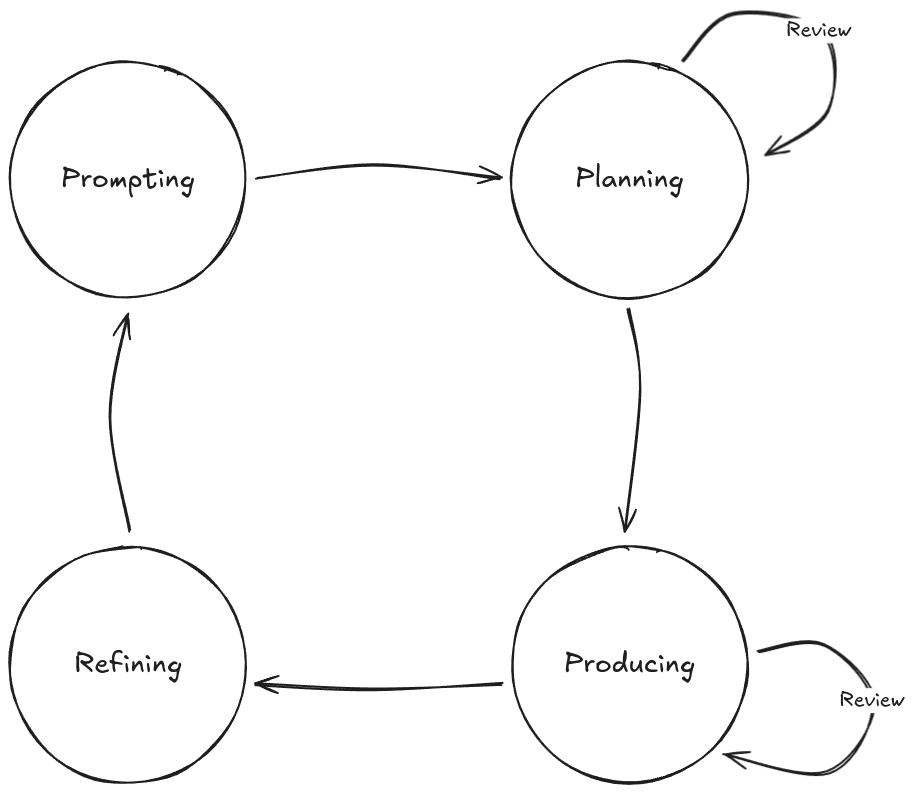
Let's be honest: a lot of people tried AI coding tools, got frustrated, and quietly went back to doing things the old way. The promised 10x productivity gains didn't materialize. In fact, for many developers, AI tools initially made things slower.
Docker engineer Craig Pave just published a refreshingly honest breakdown of what actually works—and it turns out the secret isn't magic prompts or better models. It's the same disciplines software engineers have applied for decades: break work into chunks, understand the problem first, review what worked, and iterate.
The core insight:
AI tools are not autonomous. They're tools. And like every tool before them, their impact depends on how well you use them. The developers getting real productivity gains aren't treating AI like a magic wand—they're treating it like a junior developer who needs clear instructions, supervision, and course correction.
The four-phase cycle:
Pave outlines a practical workflow for agentic AI tools like Claude Code:
- Prompting: Give clear, focused instructions with clean context
- Planning: Work with the AI to construct a change plan before it writes code
- Producing: Guide the AI as it makes changes—don't just let it run unsupervised
- Refining: Capture what worked, update your steering documents, improve for next time
Skip the planning phase and you'll get code that technically works but doesn't fit your architecture. Skip the refining phase and you'll fight the same battles repeatedly.
Context management is everything:
Here's a practical insight that's easy to miss: AI output quality decreases as context accumulates. Errors linger. Outdated information causes confusion. Irrelevant details lower output quality.
The fix? Clear context between tasks. Start fresh. Re-prompt with only what the AI needs for the current task. With Claude Code, that's /clear. Don't let accumulated context poison your results.
If you need knowledge to persist between sessions, dump it into markdown files that the AI can reference on demand—not context it carries around forever.
Why this matters for manufacturing:
If you're building internal tools, dashboards, or automation scripts for plant operations, AI coding assistants can genuinely accelerate development. But only if you use them correctly.
Real-world scenario: You need to build a simple Python script that pulls data from your historian, calculates OEE for the last shift, and posts results to a Teams channel.
The wrong way: Tell the AI "build me an OEE calculator that connects to our historian and posts to Teams." Watch it hallucinate your historian's API, guess at your OEE formula, and produce something that looks plausible but doesn't actually work.
The right way: Break it into steps. First: "Look at our historian API wrapper and tell me what methods are available for querying production data." Then: "Here's our OEE formula—write a function that calculates it from these inputs." Then: "Add Teams notification using our existing webhook pattern." Each step is reviewable. Each step builds on confirmed understanding.
The stuff people skip (but shouldn't):
- Read the plan carefully. If the AI proposes rewriting huge amounts of code, that's a red flag. Most development should be incremental.
- Catch mistakes early. AI will use string literals instead of constants, inconsistent naming, subtle anti-patterns. Treat AI code like code from a junior developer—review it properly.
- Build steering documents. When the AI struggles with something repeatedly, document the pattern. Add it to your CLAUDE.md or equivalent. Pay the teaching cost once, not every session.
Project structure matters more than you think:
AI tools navigate your codebase like a new team member would. Clean, consistent directory structures help. Scattered files, duplicate folders, and legacy cruft confuse both humans and AI. If restructuring isn't an option, at least document the patterns so the AI knows where to look.
The bottom line: AI coding tools aren't magic, but they're not useless either. The productivity gains are real—for developers who invest the time to learn proper workflows. Treat AI like a tool that requires skill to use well, not a replacement for thinking.
Learning Lens
Advanced MCP + Agent to Agent: The Workshop You've Been Asking For
If you've been building with MCP and wondering how to take it to the next level—multi-server architectures, agent orchestration, and distributed intelligence—this one's for you.
On December 16-17, Walker Reynolds is running a live, two-day workshop that goes deep on Advanced MCP and Agent2Agent (A2A) protocols. This isn't theory—it's hands-on implementation of the patterns that enable collaborative AI systems in manufacturing.
Here's what you'll build:
- Multi-server MCP architectures with server registration, authentication, and message routing
- Agent2Agent communication protocols where specialized AI agents collaborate to solve complex industrial problems
- Production-ready patterns for orchestrating distributed intelligence across factory systems
The Format:
- Day 1: Advanced MCP multi-server architectures (December 16, 9am-1pm CDT)
- Day 2: Agent2Agent collaborative intelligence (December 17, 9am-1pm CDT)
- Live follow-along coding + full recording access for all registrants
Early Bird Pricing: $375 through November 14 (regular $750)
Whether you're architecting UNS environments, building agentic AI systems, or just tired of single-server MCP limitations, this workshop gives you the architecture patterns and implementation playbook to scale.
Why it matters: MCP is rapidly becoming the backbone for connecting AI agents to industrial data. Understanding how to orchestrate multiple servers and enable agent-to-agent collaboration isn't just a nice-to-have—it's the foundation for autonomous factory operations.
Byte-Sized Brilliance
The Butterball Turkey Talk-Line Has Answered 100 Million Questions
Since Thanksgiving is upon us, here's one that hits close to home: the Butterball Turkey Talk-Line has been running since 1981. That's 44 years of fielding panicked calls from home cooks who forgot to thaw the bird, aren't sure if it's done, or just discovered Grandma's "secret recipe" involves questionable food safety practices.
Over those four decades, they've answered more than 100 million questions—all about turkey preparation. That's not a typo. One hundred million.
At peak times on Thanksgiving Day, the hotline handles over 10,000 calls. They've heard everything: turkeys cooked in the dishwasher (don't), turkeys thawed in the bathtub with the family's pet (really don't), and one memorable caller who'd been storing a turkey in their trunk for a week because the fridge was full.
Here's where it gets interesting for operations folks: Butterball didn't just wing it (pun intended). They built a knowledge base, trained experts, developed response protocols, and continuously refined their process based on decades of caller data. They knew which questions spiked at which times, what regional variations existed, and how to triage urgent food safety issues from general cooking questions.
Sound familiar? That's basically a help desk operation with 44 years of continuous improvement.
And yes, they've now added AI chatbots to handle the overflow. Because even the most well-staffed operation eventually realizes that answering the same questions at scale is exactly what AI is good at.
The takeaway: The best operations—whether it's turkey hotlines or factory floors—are built on captured knowledge, consistent processes, and knowing when to augment human expertise with automation. Butterball figured that out in 1981. The rest of us are still catching up.
Happy Thanksgiving. Don't cook the turkey in the dishwasher.
 |
|
|
|
|
|
|
|

Responses