

Presented By

View in web for best experience
Spring has officially arrived. The flowers are blooming, the days are longer, and somewhere in a Detroit suburb, a junior engineer is staring at a Grafana dashboard that says everything is perfectly fine — right before the cluster silently spins up three new nodes for no apparent reason.
That's kind of the vibe in manufacturing tech right now. Surface-level readings look great. AI is "transforming" the factory floor. Robots are "ready for prime time." Your AI coding tools are making your team "10x more productive." The dashboards all say green.
But dig an inch below the surface, and the story gets a lot more interesting. Humanoid robots are showing up in real factories — and Bloomberg's industrial reporter just made a pretty compelling case that most factories don't actually need them. AI coding agents are delivering results, but the data on whether they're actually speeding teams up is... complicated. And Kubernetes clusters are silently bloating their node counts while utilization metrics look completely normal.
The through-line this week: things that look fine, aren't always fine — and the engineers who know the difference are the ones who actually own their systems.
Here's what caught our attention this week:
Humanoid Robots Are on the Factory Floor. But Do You Actually Need One?
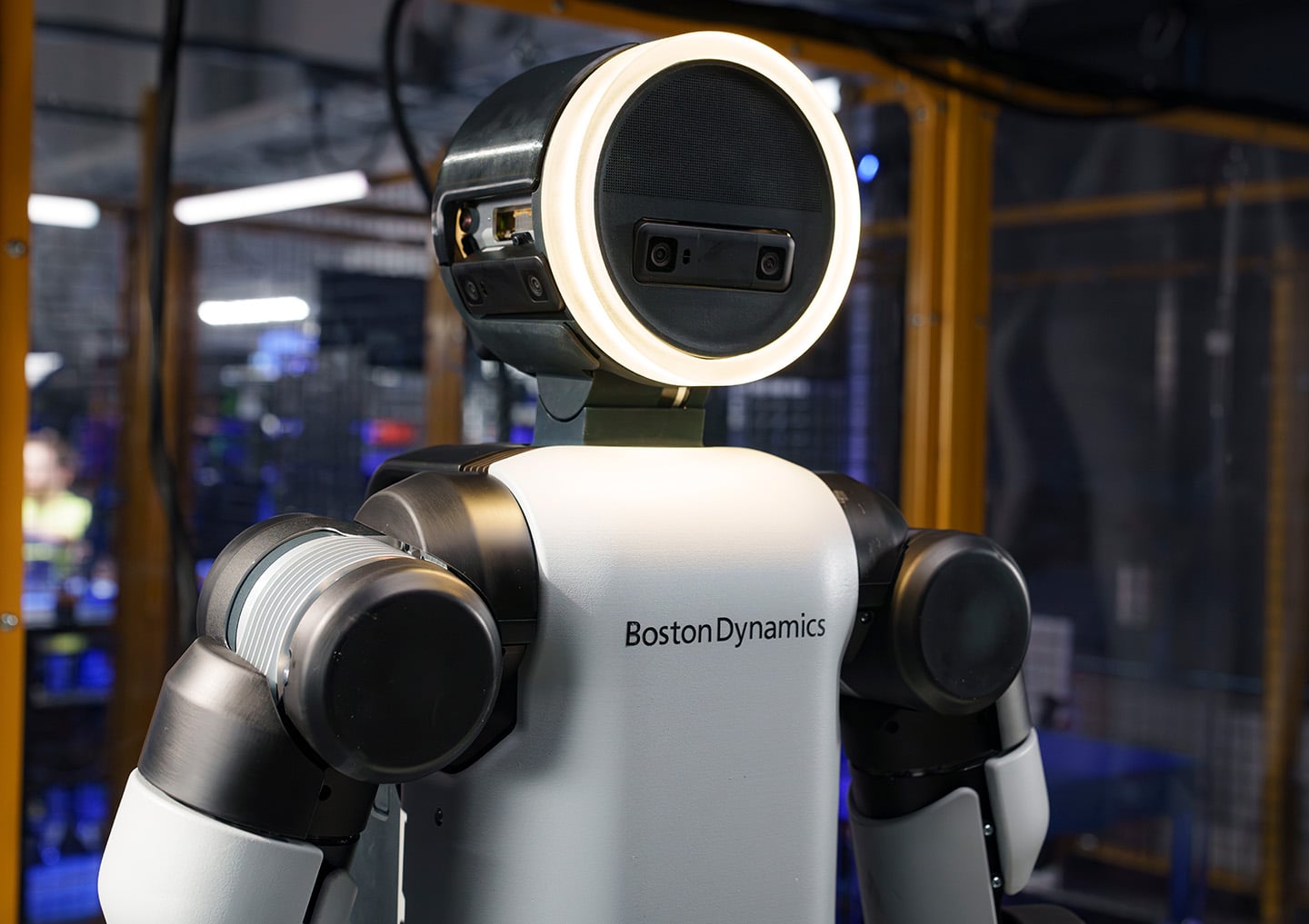
The robots have arrived. Not in a sci-fi thriller — in actual production facilities, doing actual work. But before your plant manager starts drafting a capital request for a bipedal workforce, there's a reality check worth reading first.
The deployments that are actually real:
Let's start with what's genuinely happening. These aren't concept demos anymore:
- BMW's Spartanburg, SC plant ran a 10-month pilot with Figure AI's Figure 02 robot, which assisted in producing more than 30,000 BMW X3s — five days a week, ten hours a shift, doing sheet metal retrieval and parts handling. BMW has since added a second humanoid (AEON) at its Leipzig, Germany facility.
- Boston Dynamics' Atlas is now deployed at Hyundai's Metaplant in Georgia. All 2026 deployment slots are fully committed. Atlas connects directly to MES, WMS, and other industrial systems via Boston Dynamics' Orbit software — meaning it doesn't live in isolation from your existing plant floor stack.
- Tesla is converting its entire Fremont Model S and Model X production lines to Optimus robot manufacturing, targeting up to one million units per year long-term.
- BYD already has more than 1,500 humanoid units running in its manufacturing plants.
The pattern in every successful deployment is the same: repetitive tasks, ergonomically difficult positions, or physically demanding work where cycle time and reliability can be measured precisely. These are not robots improvising. They are robots doing one well-defined thing, consistently.
Why it matters for manufacturing:
The economic logic is straightforward. Factories were built for human bodies — the workstations, the tooling, the floor layout. A humanoid robot that can step into that environment without a multi-million dollar retooling of the line is genuinely compelling, especially against a backdrop of persistent skilled labor shortages. The International Federation of Robotics puts the global industrial robot installation market at an all-time high of $16.7 billion, and humanoid funding in Q1 2026 alone has already crossed $3 billion.
But here's the cold water:
On March 20, Bloomberg's industrial reporter made a pointed argument that most factory assembly tasks simply don't require a humanoid form factor. Many operations involve fewer degrees of movement than a full bipedal robot provides. Industrial leaders said that fully autonomous humanoids meeting the strict safety and operational standards of real assembly lines remain a longer-term goal — and the complexity of a human-shaped robot creates reliability and maintenance overhead that simpler automation avoids entirely.
Translation: a $200,000 humanoid robot that needs extensive safety validation and software integration may be overkill for a task a $40,000 cobot arm was already handling fine.
Here's how this plays out on the factory floor:
Imagine you're the automation lead at a mid-size automotive supplier. You have three open roles in a heat treatment area — physically punishing work, high turnover, safety incidents every quarter. A humanoid robot is worth exploring there. Now imagine someone proposes a humanoid for your final inspection station, where a technician makes dozens of micro-decisions per unit based on context and experience. That's a very different conversation.
The real-world deployments — BMW, Hyundai, BYD — all share a crucial detail: they started with a single, well-scoped task in a controlled area and measured everything before expanding. Nobody deployed 500 robots on day one.
The bottom line: Humanoid robots are real, they're in production, and they're worth putting on your 2026 roadmap. Just make sure the problem you're solving actually needs a humanoid — and not just a better cobot placement.
Read the Bloomberg take → | Read the Boston Dynamics Atlas announcement →
Are AI Agents Actually Making Your Team Slower? The Data Is Uncomfortable.
Here's a question nobody at your last vendor demo asked: what if deploying AI agents is making things worse?
Not theoretically. Actually, measurably worse — more bugs shipped, more outages, slower delivery velocity. A deep-dive published this week surfaces exactly that pattern across real engineering teams, and it's worth sitting with before you greenlight your next agentic AI rollout.
What's happening:
As AI agent usage grows, some teams are seeing a counterintuitive result. Instead of moving faster, they're cleaning up more AI-generated messes. The core issues breaking down into a few familiar patterns:
- Quality drops quietly. Agents generate plausible-looking outputs that pass a quick review but contain subtle errors — wrong logic, stale assumptions, or code that works in isolation but breaks in context.
- Coordination gets murkier. When an agent handles a task, the human who would have done it loses visibility into how it was done. That creates knowledge gaps that show up later as incidents.
- Over-reliance kicks in fast. Teams that start using agents for low-stakes tasks gradually hand off higher-stakes ones without adjusting their review rigor. The agent's confidence doesn't scale with the task complexity. Your team's skepticism should.
Why this matters for manufacturing:
You might be thinking: "This is about software teams, not factories." Fair — but consider where manufacturing is heading.
Agentic AI is actively being pitched for production scheduling, maintenance work order generation, supplier coordination, and quality exception handling. Deloitte projects a jump from 6% to 24% agentic AI adoption in manufacturing this year alone. The same failure modes that are biting software teams will bite operations teams — just with higher stakes.
A misclassified exception in a code review creates a bug. A misclassified quality exception on an assembly line creates a recall.
Real-world scenario:
Your predictive maintenance agent flags a bearing anomaly on Line 3 and autonomously generates a work order. A technician responds, inspects, finds nothing obvious, closes the ticket. Two weeks later, the bearing fails mid-shift — turns out the agent had been generating low-confidence flags that the team learned to dismiss because the false positive rate was never properly tracked.
The agent wasn't broken. The governance around it was.
The actual lesson here:
This isn't an argument against AI agents. It's an argument against deploying them without a feedback loop. The teams that are seeing the best results share a few habits:
- They define what "good output" looks like before deploying the agent, not after
- They track agent error rates the same way they track equipment OEE — as a KPI, not an afterthought
- They keep humans accountable for agent outputs, not just agent inputs
The slot machine analogy making the rounds in engineering circles is apt: if your team is just hitting "generate" and hoping for the best, you're gambling — not engineering.
The bottom line: Agentic AI in manufacturing is real and worth pursuing. But an agent that executes without proper oversight isn't automation — it's technical debt with a chatbot on top.
Your Kubernetes Cluster Is Adding Nodes. Your Dashboard Says Everything Is Fine. Both Are True.

Here's a scenario that's becoming increasingly common: your cloud bill ticks up, your ops team notices the cluster scaled out again overnight, and when you pull up the dashboards — CPU utilization normal, memory headroom looks fine, no alerts fired. Nothing appears wrong.
So why did Kubernetes just spin up three new nodes?
This is one of the most quietly expensive misunderstandings in infrastructure today, and it's getting worse as AI workloads move into production. The New Stack broke it down this week, and the explanation is more instructive than the headline suggests.
First, a quick primer on how Kubernetes thinks:
Kubernetes (K8s) is a container orchestration platform — think of it as the traffic controller for your software workloads. It decides which server ("node") runs which application ("pod"), and it scales the cluster up or down based on demand.
The critical detail: Kubernetes doesn't schedule pods based on actual resource usage. It schedules based on resource requests.
A resource request is essentially a reservation. When a developer deploys an application, they declare: "this app needs X amount of CPU and Y amount of memory." Kubernetes holds that capacity for the pod — whether the app is actually using it or not.
Your dashboard shows actual utilization. Kubernetes makes decisions based on reservations. Those two numbers are often very different, and that gap is where your cloud bill quietly grows.
Why it's getting worse right now:
The CNCF's latest annual survey confirms what most platform teams already feel: Kubernetes has become the default platform for running AI in production. That means more inference workloads — predictive maintenance models, quality vision systems, demand forecasting — are landing on K8s clusters.
AI inference workloads are bursty by nature. A vision model doing real-time defect detection on a production line might spike hard for 30 seconds, then sit nearly idle. Developers often set resource requests conservatively high to handle those peaks. The result: the cluster looks headroom-starved to the scheduler even when actual utilization is modest, and the autoscaler dutifully adds nodes that are never fully used.
Why this matters for manufacturing:
If your team is running any of the following on Kubernetes, this problem applies to you directly:
- Edge AI inference — vision systems, anomaly detection models running at or near the plant floor
- IIoT data pipelines — ingesting sensor data from PLCs, historians, or SCADA systems into a cloud or on-prem platform
- Digital twin workloads — simulation and modeling jobs that run on demand
- MES or ERP adjacent services — microservices that connect operational systems to analytics layers
Stale resource requests in any of these can cause your cluster to scale out unnecessarily — driving up cloud costs, complicating capacity planning, and creating a false sense of infrastructure health.
Here's how to actually fix it:
The good news: this is a configuration problem, not an architecture problem. A few practical steps:
- Audit your resource requests vs. actual usage. Tools like Goldilocks (open source, from Fairwinds) will analyze your workloads and recommend right-sized requests based on real consumption data. Most teams find their requests are 2-5x higher than actual usage.
- Use Vertical Pod Autoscaler (VPA) in recommendation mode first. VPA watches your pods and suggests better resource settings without automatically applying them — giving you a low-risk way to tune before committing.
- Separate bursty AI inference workloads from steady-state services. Different scheduling profiles, different node pools. Your predictive maintenance model and your MES integration service don't belong on the same autoscaling logic.
- Check for "zombie" resource requests. Old deployments, deprecated services, and staging workloads that never got cleaned up are common culprits. Run
kubectl describe nodesand look for pods holding resources they're not actually using.
The bottom line: Your Kubernetes dashboard isn't lying to you — it's just answering a different question than the one you're asking. Utilization and reservations are not the same thing, and in an era of bursty AI workloads on the plant floor, understanding that difference is the difference between a right-sized cluster and a runaway cloud bill.
A Word from This Week's Sponsor
Manufacturers don’t need more disconnected tools. They need a better way to unify data, applications, and operations.
Fuuz is an AI-driven Industrial Intelligence Platform that helps manufacturers connect siloed systems, contextualize data, and turn that data into action. With a cloud-native architecture, edge capabilities, and a low-code/no-code environment, Fuuz makes it easier to build and scale industrial applications for MES, WMS, CMMS, and more.
From data modeling and API generation to real-time flows and application design, Fuuz gives manufacturers the tools to reduce complexity, improve visibility, and create more connected, resilient operations.
Design your solution today: fuuz.com/contact-us
Learn more: fuuz.com
Cursor Just Built Its Own AI Brain. Here's Why That's a Bigger Deal Than the Benchmarks.
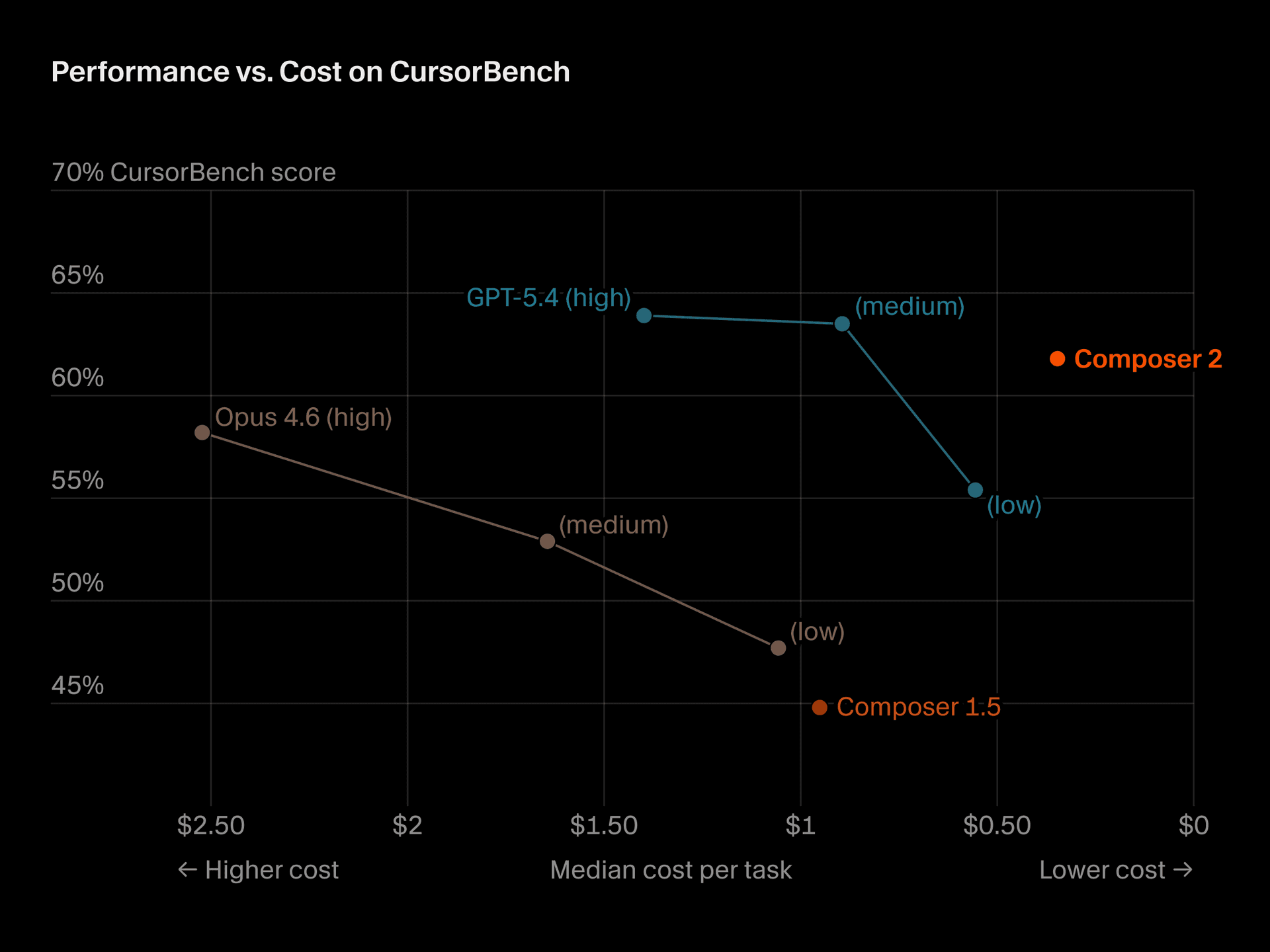
On March 19, AI coding platform Cursor released Composer 2 — its own in-house coding model built specifically for agentic software development. It's faster, dramatically cheaper than its predecessor, and scores competitively against frontier models on real coding benchmarks. But the most interesting part of this story isn't the model itself. It's what it signals about where AI-assisted development is heading.
What Composer 2 actually is:
Cursor is an AI-powered code editor used by more than 1 million developers daily. Think of it as an IDE — like Visual Studio Code — but with an AI agent baked in that can read your entire codebase, write and edit files, run terminal commands, and chain together hundreds of steps to complete complex tasks autonomously.
Up until now, Cursor ran on top of models from OpenAI and Anthropic. With Composer 2, they've built their own. Here's what's notable:
- It's code-only, by design. Cursor's co-founder said it "won't help you do your taxes" and "won't write poems." Every parameter was trained on code. That focus is the point.
- It handles long-horizon tasks. Using a technique called compaction-in-the-loop reinforcement learning, Composer 2 can solve problems requiring hundreds of sequential actions without losing track of what it's doing — a major limitation of earlier coding agents.
- It's significantly cheaper. Composer 2 Standard runs at $0.50 per million input tokens and $2.50 per million output tokens. Its predecessor, Composer 1.5, cost $3.50 and $17.50 respectively. That's an 86% price drop — making serious agentic coding workflows viable at a scale that wasn't economical before.
- Benchmark results: 61.7 on Terminal-Bench 2.0 (up from 47.9), 73.7 on SWE-Bench Multilingual (up from 65.9). GPT-5.4 still leads at 75.1 on Terminal-Bench, but Composer 2 outperforms Claude Opus 4.6 on both benchmarks.
Why this matters beyond the developer world:
You might be wondering what a code editor update has to do with your plant floor. More than you'd think.
Industrial software is being written and maintained at a pace that traditional development cycles can't keep up with. OT/IT integration projects, custom SCADA interfaces, MES connectors, IIoT data pipeline scripts, edge AI deployment tooling — these projects land on the desks of engineers who are skilled at automation and controls, but aren't necessarily full-time software developers.
Agentic coding tools like Cursor are increasingly the bridge. An controls engineer who understands the problem domain deeply can now direct an AI agent to write, debug, and refactor the code — with the agent handling the syntax, the boilerplate, and the multi-file coordination.
Here's how this plays out on the factory floor:
Your team needs a custom connector between your historian and a new cloud analytics platform. Historically that's a 3-week ticket for an IT developer who has to get up to speed on the OT context before writing a single line. With an agentic coding tool, your controls engineer — who already knows the historian inside out — can direct the agent through the integration, review outputs at each step, and ship something workable in days.
That's not hypothetical. It's happening at industrial companies right now, quietly, with tools exactly like this one.
The strategic subtext:
Cursor is valued at $29.3 billion and crossed $2 billion in annualized revenue as of February 2026 — 33 months after being founded. By building Composer 2 in-house, they're reducing dependence on OpenAI and Anthropic while protecting margins. The race to own the AI development workflow is accelerating, and the companies that win it will have enormous influence over how industrial software gets built for the next decade.
The bottom line: Composer 2 is a meaningfully better and dramatically cheaper coding agent. But the real headline is that purpose-built, domain-specific AI models — trained to do one thing exceptionally well — are arriving. That principle applies as much to factory floor AI as it does to code editors.
Read the Cursor announcement →
Learning Lens
Control Your AI Coding Agent From Your Phone

A new trick worth knowing this week.
Anthropic just shipped something quietly useful on March 20 — Claude Code Channels, now in research preview.
Here's the idea: Claude Code is a terminal-based AI coding agent. Powerful, but up until now you had to be sitting at your terminal to interact with it. Channels changes that. It connects your running Claude Code session to Telegram or Discord via MCP (Model Context Protocol) — so you can message your session from your phone, get updates, and direct it while you're away from your desk.
Why this matters practically:
Think about the long-running tasks that eat your day. Kicking off a build. Running a refactor across dozens of files. Waiting on a test suite. With Channels, you fire off the task, step away, and get notified when Claude needs input — or when it's done. Your phone becomes a remote control for your terminal.
A few things worth knowing before you set it up:
- Claude Code must already be running. Channels don't spin up a new session — they bridge into an existing one. Common setup: leave a session running inside
tmuxorscreenso it persists while you're away from your desk. - The
--channelsflag is required at session start. Having the plugin in your.mcp.jsonfile alone won't activate it. You have to explicitly name it in the flag when you launch the session. - Permission prompts will stall your session silently. If Claude hits an action requiring approval while you're away, it stops and waits — no Telegram notification. It just sits there until you return to the terminal. This is the most common gotcha for first-time users.
- Team and Enterprise plans: an admin must enable Channels in managed settings before any individual setup works. Check that first before troubleshooting anything else.
The manufacturing angle:
You might be thinking this is squarely a developer tool. Fair — but if your team is writing integration scripts, building MES connectors, or maintaining IIoT data pipelines (which more industrial teams are every year), this is directly applicable. A controls engineer can kick off a long debugging or refactoring task before a plant walkthrough and check in on progress from their phone between rounds. That's not hypothetical — it's the exact workflow this feature was built for.
Get started: Claude Code v2.1.80 or later required. Requires claude.ai login. Full setup docs → | See the original announcement →
Byte-Sized Brilliance
This year, How It's Made turned 25.
The Canadian documentary series premiered on January 6, 2001, and for the next 18 years it did something deceptively simple: it pointed a camera at a factory floor and let the machines do the talking. No drama. No host. No interviews. Just a deadpan narrator, a conveyor belt, and roughly five minutes to explain how the thing you'd never thought twice about actually gets built.
Over 32 seasons and 416 episodes, the show documented somewhere north of 1,500 manufacturing processes — aluminum foil, contact lenses, helicopter rotors, gummy vitamins, micro drill bits, and yes, even a plumbus (look it up). The Wall Street Journal called it "TV's quietest hit." At its peak it was pulling millions of viewers who had no professional reason to care how a hockey puck gets vulcanized or a glass bottle gets blown. They just... couldn't stop watching.
Here's what's worth sitting with on that anniversary: How It's Made was essentially a 18-year argument that manufacturing is inherently interesting — that if you slow down and actually show people how things are made, they'll lean in every time. The show never needed explosions or conflict. The process was enough.
That argument holds up pretty well in 2026. Your plant floor isn't boring. The machines aren't boring. The logistics aren't boring. They're just rarely explained in a way that makes people care. The engineers and operators who built their careers on these systems know this — every person who's ever given a factory tour to someone who'd never been inside one knows the look on their face when the line starts moving.
Twenty-five years later, the job of communicating what manufacturing actually is — and why it matters — is more important than ever. It's kind of what we're here for.

Responses